


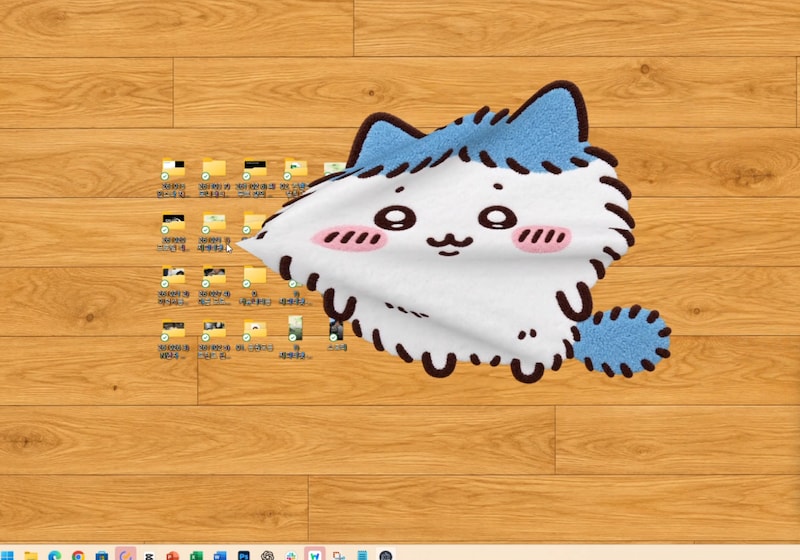
안녕하세요! 여러분 오늘은 회사 모니터에 깔 수 있는 러그앱을 가져왔습니다!
최근 국내외에서 자주 보이는 모니터 러그 프로그램을 좋아하는 (털찐) 하치 버전으로 만들어 보았습니다.
일하다 찌드는 바로 그 순간.. 업무폴더 가리면 기분이 조금 나아져요.
프롬프트만 공유하면 만들기 귀찮은 거 다 알기 때문에..
여러분의 시간과 크레딧을 아껴드리기 위해 제가 작업한 털찐 하치 러그는 배포하고, 러그 만드는 프롬프트도 하단에 있으니 평소 덕질하는 캐릭터로 러그를 만들어보세요!!
+ 같이 사용할 수 있는 바닥 배경화면 2종도 준비했어요!!
프로그램 이용/다운로드 정보
- 야근 포도알스티커판 앱다운로드(Mac/Win) : https://bosong-rug-fanmade.fw95kgzjkw.chatgpt.site/
- 바닥 배경화면 (나무바닥&사무실 바닥)도 다운받을 수 있습니다!
- 사용법도 다운로드 페이지안 하단에 있어요!
현재 앱은 개발자 배포 서명·공증이 적용되지 않은 테스트 버전입니다. 윈도우 실기 검증과 Intel Mac 검증도 아직 완료되지 않았습니다. 보안 경고가 뜨거나 회사 정책으로 차단될 수 있어요. 회사 보안 설정을 해제하지 마세요. 실행이 제한된다면 IT 담당자에게 확인하거나 아래 웹 버전을 이용해 주세요. 오류가 생기면 사용하는 코덱스 혹은 클로드코드에게 수정해달라고 요청해주세요 |
사용 방법
맥용과 윈도우용 2버전 다 만들었는데, 맥은 상단바에 아이콘이 있어서 그걸 이용해 종료하면 되고, 윈도우는 작업표시줄에 아이콘이 뜹니다!
(하단 사진은 윈도우 기준!)
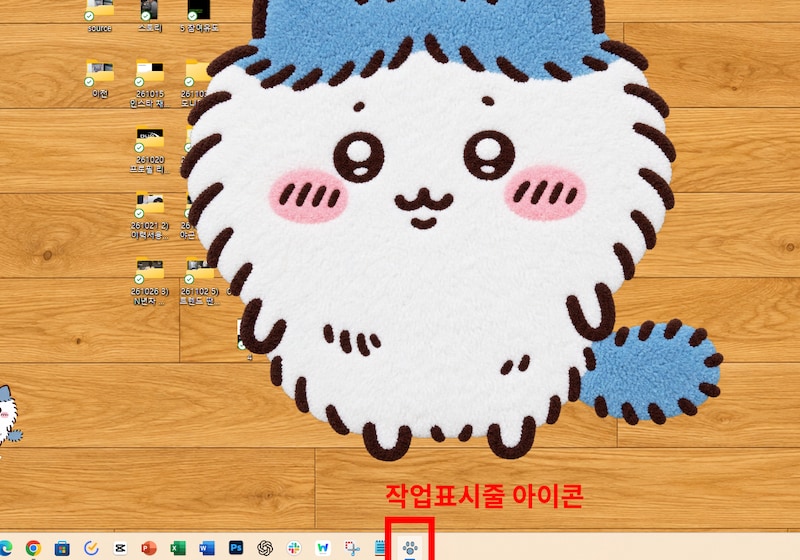
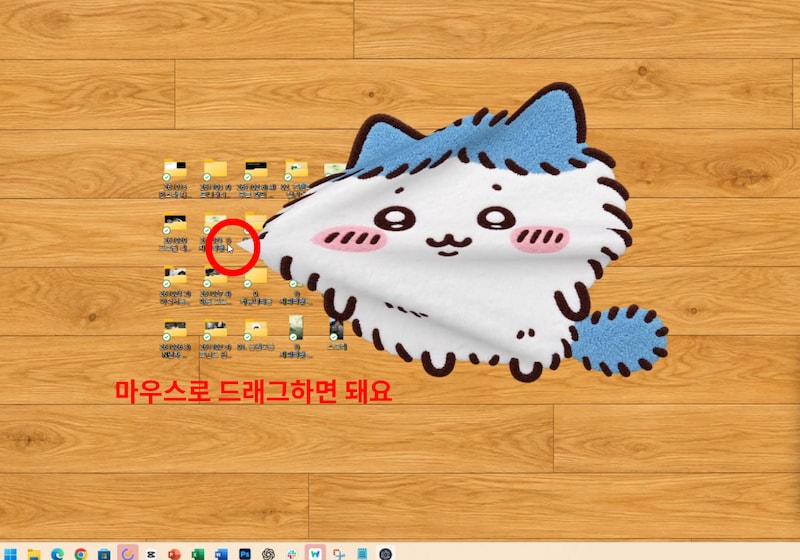
드래그를 해서 러그를 이동하거나 던지거나 구길 수 있습니다.
폴더를 가릴 수도 있어요.
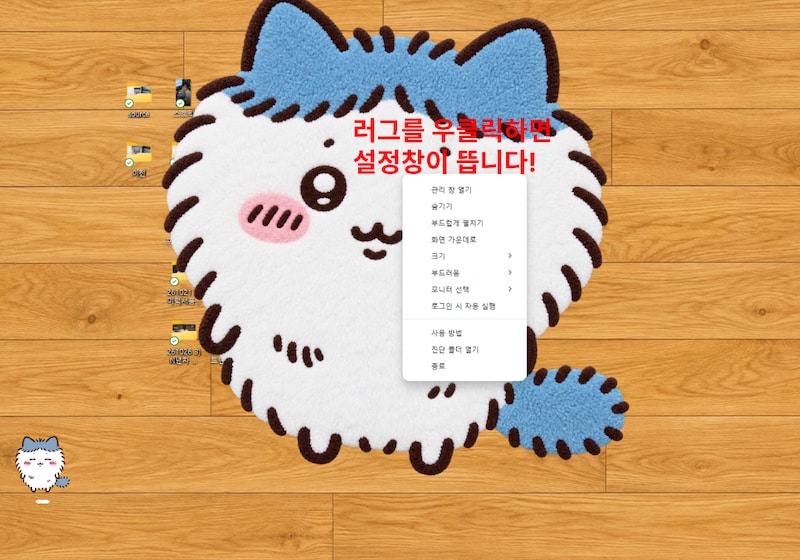
러그 위에서 우클릭하면 설정을 볼 수 있어요.
그 외 간단한 조작법은 아래와 같습니다!
- 더블클릭 : 구겨진 러그 펼치기
- 드래그 : 러그 당겨서 원하는 위치로 이동
- 마우스휠/스크롤 : 러그 사이즈 변경
그 외 자세한 조작법은 다운로드 페이지에 같이 정리해놓았습니다!
가끔 PC별로 오류가 생길 수도 있으니, 오류가 생기면 앱을 종료 후 키거나 사용하는 AI에게 (GPT codex 혹은 클로드코드) 수정을 요청하시면 됩니다.
만드는 방법
- 평소 좋아하거나 원하는 캐릭터 이미지를 하단에 있는 최하단 프롬프트와 함께 첨부해주세요. 화질이 너무 깨지거나 잘린 이미지보단 선명하고 원하는 캐릭터 모양이 잘 나온 이미지를 준비해주세요
- 적합한 이미지가 없다면 원하는 러그 이미지를 별도 대화방에서 AI로 만든 후 작업하는 것 추천
- GPT codex 이용하여, 아스트라 모드로 제작해 주세요. (유료 구독과 크레딧이 소모됩니다.)
- 오류가 발생하거나 추가 기능을 원한다면 작업하던 대화창을 통해 GPT에게 수정 요청을 해 주세요.
그럼 다음에도 재미있고 유용한 거 들고 올게요!!

더 많은 재미있고 유용한 AI/테크 정보가 궁금하다면?
| 다나와 매거진 인스타그램 계정 바로가기 →
프롬프트
*2000자 이상이라 본문에 첨부합니다! 복붙해서 사용하세요!
| Build a fully functional desktop “character rug” app using the character image I attached. I want an app that I can install and use personally, even though I have no programming knowledge. Respond to me in Korean. Use Korean for the app’s menus and installation instructions. First, automatically detect the operating system and native CPU architecture of my actual computer using the connected local environment. Build the app for that machine. Do not confuse a remote server, container, or cloud sandbox with my computer. If you cannot reliably identify the target computer, ask me which operating system and processor it uses before choosing the build target. Check what the current environment can actually build and test. Briefly explain any relevant limitations, then proceed with the work that is possible. Deliver a working desktop application, not just a webpage, mockup, animation demo, or source code. Choose suitable technologies and implement the following requirements. 1. Character appearance and rug texture Preserve the attached character’s silhouette, facial expression, proportions, and original colors. Give it a soft, plush rug texture. Keep originally white areas white without an unintended yellow tint. Preserve colored details and outlines. Do not invent extra outlines or seams between the body and limbs. Remove the image background and make the area outside the character transparent. The rug itself should follow the character’s silhouette. If the supplied image already has a suitable rug texture, preserve it. 2. Desktop placement and mouse interaction Display only the rug, with no visible window frame or rectangular background. The rug must sit above desktop icons and folders so that it can visually cover them, while ordinary application windows remain above the rug. Transparent areas outside the rug must allow mouse clicks to pass through to the desktop. Only the visible rug should intercept input. Account for its current deformed shape when deciding which areas are clickable. Covering an icon must not modify, move, hide, or delete the actual file or folder. 3. Soft, lightweight cloth physics Allow me to grab any visible part of the rug and naturally bend, fold, or crumple it around the grabbed point. The rug should be soft enough to develop wrinkles with a small mouse movement. It should follow the cursor promptly without feeling heavy, sluggish, or delayed. A quick drag and release should give the rug momentum so that I can playfully toss it. After release, it should settle gently. Give it a modest, visible thickness so that it feels like a plush rug rather than a thin sheet of paper. Smooth the rendered surface sufficiently to avoid obvious angular triangles. Minimize holes, surface tearing, and folded layers passing through one another. Preserve natural folds without making the rug stiff just to prevent intersections. 4. Controls - Left-button drag: grab a local point and fold or crumple the rug. - Right-button drag: move the entire rug. - Shift + drag: move the entire rug, including when using a trackpad. - Double-click: smoothly flatten the rug. - Mouse wheel or trackpad scroll: resize the rug. - Short right-click without dragging: open the options menu. Distinguish a right-click from a right-button drag reliably. 5. Tray or menu bar controls Provide a Windows system tray icon or a macOS menu bar icon, depending on the detected operating system. Include these menu options: - Hide / Show - Flatten - Move to the center of the screen - Resize - Adjust softness - Select a monitor - Enable / disable launch at login - How to use - Quit Update the Hide / Show label immediately when visibility changes. Keep the interface minimal, without a large permanent settings window or floating toolbar. 6. Automatic startup and persistent state After the app is installed and launched for the first time, enable automatic startup at user login, with a menu option to disable it. Save and restore the rug’s last position, size, folded shape, and settings across app restarts and computer restarts. Preserve existing settings when installing an update. Use reliable state saving so that an interrupted write does not unnecessarily destroy the saved state. For macOS, instruct me to move the app into the Applications folder before the first normal launch. 7. Reliable input after hiding, showing, and switching apps The rug must remain immediately draggable after I use another application or hide and show the rug. When hiding the rug, clear any active drag and release pointer capture. When showing it again, recalculate whether the current cursor position should receive input and explicitly synchronize the native window’s click-through state with the rendered rug. Use the same recovery behavior for every way of showing the app: the options menu, tray or menu bar icon, keyboard shortcut if provided, and launching the app again while it is already running. Do not require me to move the cursor outside the rug and back inside before it becomes clickable. Handle these cases: - The cursor remains stationary over the rug while it is hidden and shown. - The rug is hidden during a drag. - The mouse button is released while the rug is hidden or another application owns the input. - Hide / Show is used repeatedly. - The computer resumes from sleep. 8. Performance and verification Reduce unnecessary physics calculations and rendering when the rug is resting. Verify dragging, tossing, folding, resizing, flattening, state restoration, transparent-area click-through, switching between applications, and repeated Hide / Show cycles. Test realistic user interaction sequences. Do not claim a reported bug is fixed solely because a test manually forced an internal state and then reset it. Clearly distinguish: - Automated tests from manual interaction tests. - Startup registration checks from an actual reboot/login test. - Build and package validation from execution on the target operating system. Final deliverables Provide: - An installable application for my computer: a Windows installer or a macOS app ZIP for the appropriate processor architecture. - The complete source code. - A short Korean installation and usage guide. For macOS, clearly state whether the app is signed and notarized. If applicable, include a plain-text first-launch guide inside the ZIP explaining the standard “System Settings → Privacy & Security → Open Anyway” process. If a required build or runtime check is unavailable, explain the limitation honestly rather than presenting unverified files as tested installers. Ask questions only when essential information is missing. Make reasonable implementation decisions for everything else and continue through implementation, testing, and packaging. |